The web-based register and back office for your antique mall or thrift store.
Booth consignment, mall-ready register, AI price lookup, and a floor-plan sandbox driven by your real sales — for antique malls, thrift stores, vintage co-ops, and consignment shops. Runs in any browser. Nothing to download.
No charge until day 31 · Cancel anytime · Set up in under a minute
What is Vintique? A modern web-based POS and back-office platform for antique malls, thrift stores, and consignment shops — built around booth-based consignment from the ground up, with mall-wide gift cards, AI item lookup, text-in photo intake from vendors, and a floor-plan sandbox driven by your real sales. As of 2026, plans start at $39/month with a 30-day free trial.
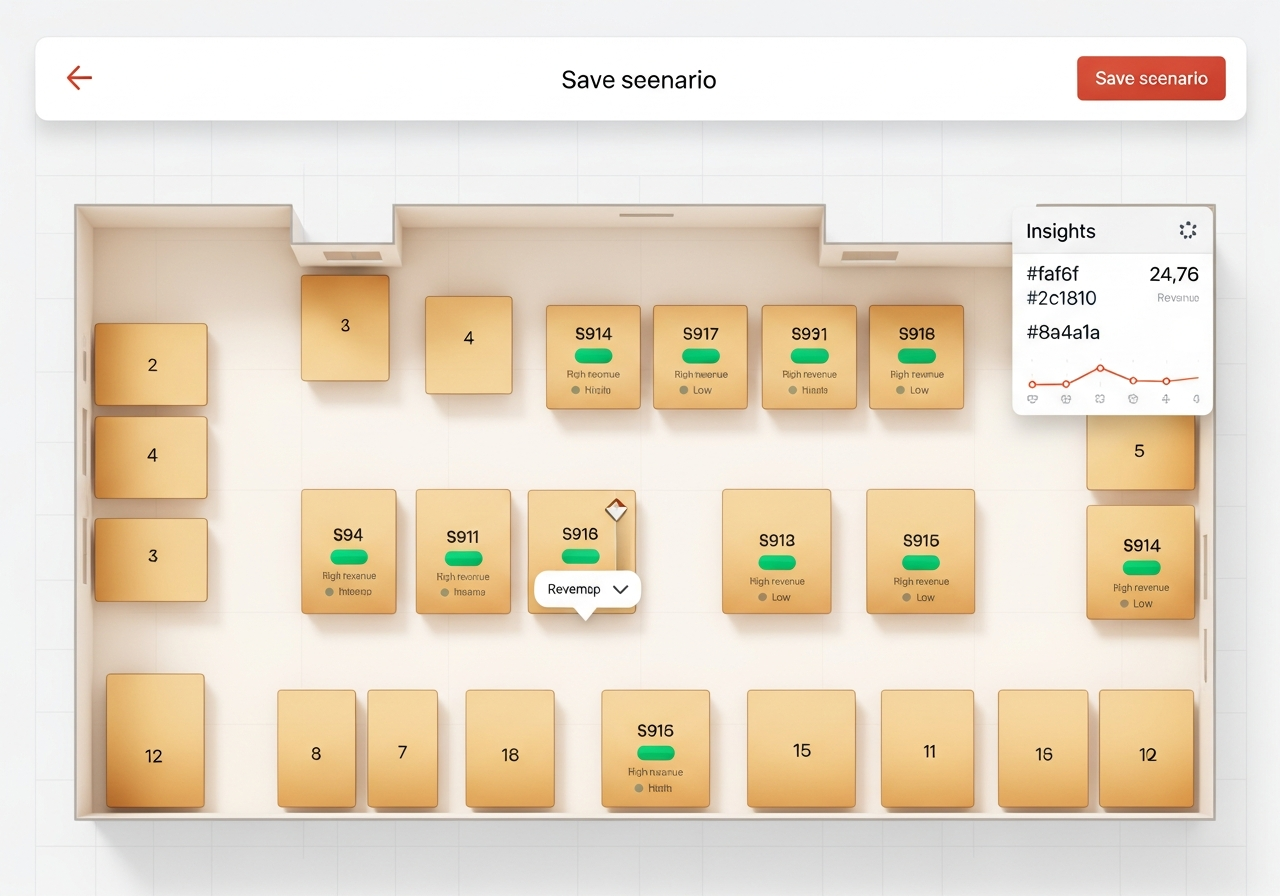
Drag booths on a layout driven by your real sales — what-if before you move a shelf.
Snap a photo, drag an image, or right-click any listing — comparables in seconds.
Per-vendor logins, consignment math, and end-of-month settlements done for you.
Cash, credit, gift card, or split — across many booths in one transaction.
Storewide and per-booth events combine in the right order, automatically.
Keep your existing terminal. We record the sale; your processor moves the money.
Vintique records the sale — your existing terminal moves the money. No per-transaction fees from us, no card data in our systems, no PCI scope to add to your plate.
“We had been on Mall Sales Manager for 20 years. It just wasn’t intuitive anymore — it didn’t keep up with the speed of our business, and it created more paperwork and hassle than it solved. There was no way to look up an item, no way to lay out the store. We switched the whole mall to Vintique in a day.”
Why dealers choose Vintique
Six things we set out to do better than a generic POS — and the reasons they matter on a busy Saturday at the mall.
Sketch the mall, drop booths into spots on a grid, and see projected revenue impact based on each booth's actual sales history. Rotate power booths, plan a renovation, or place a new vendor — all before moving a single shelf in real life.
Photograph an item at the counter, drag an image off any browser tab, or right-click a listing in our Chrome side-panel extension. Vintique pulls comparable listings from Google, eBay, and Google Shopping in seconds — so a curious estate-sale find becomes a confident tag without leaving the floor.
See the Chrome extension →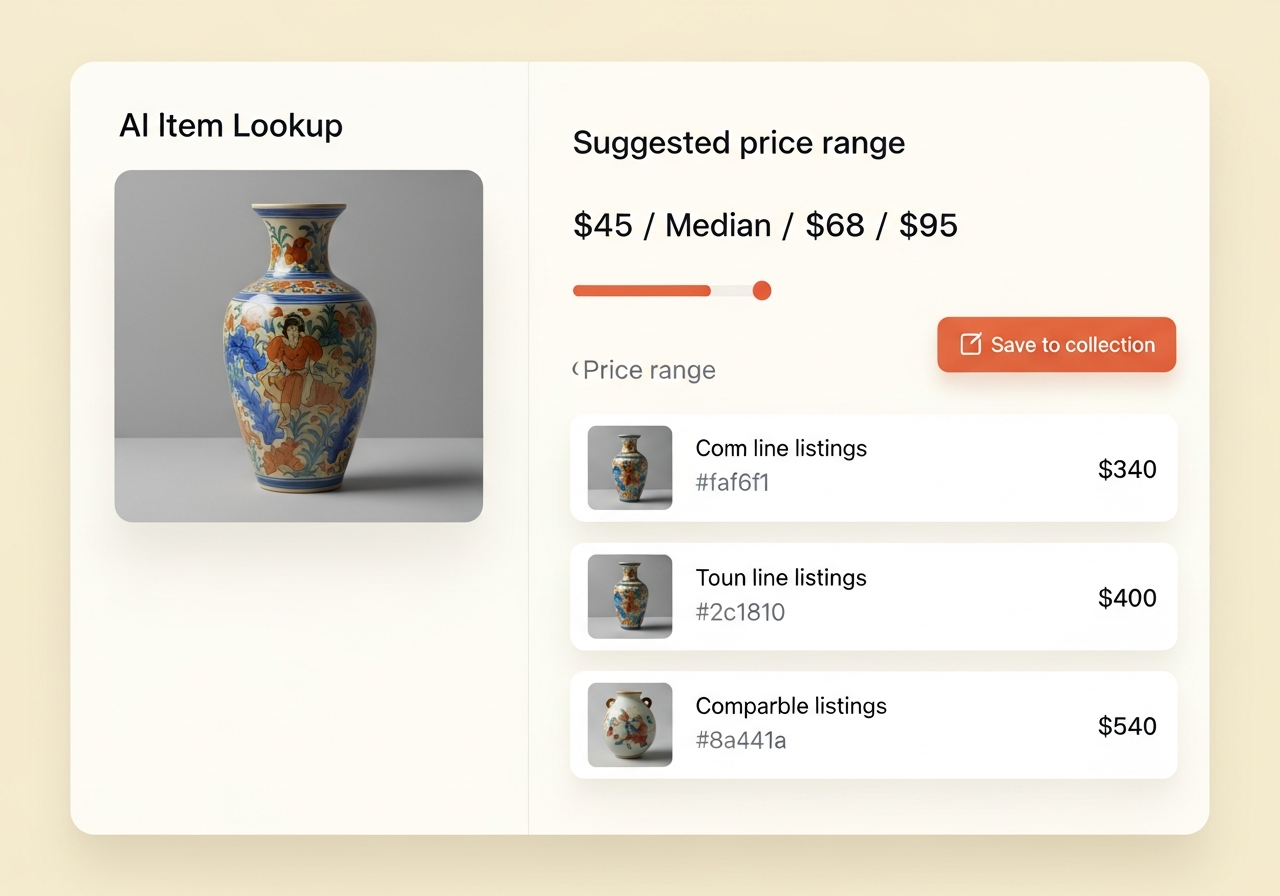
Each booth owner gets their own login with a private My Sales dashboard, real-time payouts, and consignment fees calculated automatically from their rate. Cashiers and admins are role-scoped so everyone sees only what they should.
Cash, credit, split, partial gift card — the math for many booths in one transaction is handled for you. Tax-exempt items, configurable surcharge, and per-line consignment rates are all first-class.
Run a Memorial Day storewide percent-off and let individual booths run their own sales at the same time. The register stacks them in the right order — vendor sale, storewide, then any cashier discount — and breaks each layer out on the receipt.
Keep your existing card terminal. Vintique records the sale; your processor moves the money. No per-transaction fees from us, no card data in our systems, no PCI scope to worry about.
The little things that make a long day easier
Underneath the spine are the everyday touches — grouped by who feels them most.
For your cashiers
The everyday touches that quietly speed up a busy Saturday at the counter.
Sell, redeem and track gift card balances across every booth, with a full audit trail — and a card can never go negative, even when two cashiers ring it at once.
Every sale is stamped with the cashier who rang it and every transaction with its source — month-end questions answer themselves.
Branded email receipts to shoppers without any mailing-list software. Sender email is yours.
Tablet at the register, laptop in the office, phone from the road — it all looks and feels right at home.
For your booth owners
Vendors stay informed without ever bothering the office.
A Chrome side-panel extension lets vendors right-click any image — at an estate sale, on Marketplace, anywhere — and price it against comparables.
Download & install →Each mall gets a dedicated number — booth owners text a photo and it lands as a draft on their booth, price suggestion already attached.
Web uploads, MMS texts, and pasted marketplace URLs all land in the same combined Items workflow as drafts. Confirm, tag, and they go live.
Booth owners get a clean summary of their day — no app to open, no login to remember, no phone calls to the office.
For you, the operator
The back-office details that make running the mall feel less like a second job.
Daily, monthly and annual reports with payment splits, tax breakdowns, and per-vendor settlements you can export to PDF or CSV.
Bring vendors, items, gift cards and historical sales over from SimpleConsign, Ricochet, ConsignPro, Liberty, Quail, or a generic CSV — preview every row, one-click undo.
A four-step tour walks new admins through their first password, booth, sale, and cashier invite — with optional sample data to see the app full of life.
Request a full ZIP export of every booth, transaction, gift card, item and setting whenever you like. 30-day grace window if you ever close the mall.
Here's where we tend to fit better
If you're weighing your options, here's a quiet side-by-side of the things antique malls usually ask us about — no hard feelings toward the other tools.
| What you need | Vintique | Generic POS (Square, Clover, Lightspeed) | Spreadsheets (Excel + paper) |
|---|---|---|---|
| Per-vendor consignment math (auto) | Yes | Manual / add-on | Manual |
| Vendor logins with private My Sales | Yes | No | No |
| Mall-wide gift cards & redemption | Yes | Per-merchant only | No |
| Tax-exempt sales by booth/owner | Yes | Manual | Manual |
| Switch from another system in an afternoon | Built-in CSV importer w/ undo | DIY | DIY |
| Browser extension for in-the-field price lookup | Yes (Chrome) | No | No |
| Text-in (MMS) photo intake from vendors | Built in | No | No |
| Storewide + per-booth sales that auto-stack | Built in | Manual | Manual |
| Floor-plan sandbox driven by real sales data | Built in | No | No |
| Daily vendor sales emails | Built in | No | No |
| AI item-lookup pricing | Built in | No | No |
| Full data export (ZIP) on demand | Yes | Limited / manual | It's already yours |
| Per-transaction processing fees | $0 | 2.6% + 10¢ | $0 |
| Set-up time | Under a minute | Hours to days | Ongoing |
Comparison reflects standard plans of each product as of 2026. Vintique itself is a record-keeping system; payment processing happens in your existing terminal.
Simple, predictable pricing
One subscription per mall. No per-transaction fees. No surprise invoices. Always 30 days free first.
Starter
For new malls finding their footing.
30-day free trial · cancel anytime
- Full POS register — cash, card, gift card, split
- Vendor logins & My Sales dashboard
- AI item lookup, store layout sandbox & Chrome extension
- Storewide & per-booth sale events that stack
- Gift cards, holds & item collections
- CSV importer with one-click undo
- Email support
Growth
Most popular for established malls.
30-day free trial · cancel anytime
- Every Starter feature — POS, vendor logins, AI lookup, sandbox, sale events, gift cards, CSV importer
- Higher booth vendor capacity
- Priority email support
- Guided onboarding session
Unlimited
For multi-location and high-volume malls.
30-day free trial · cancel anytime
- Every Starter & Growth feature — the full Vintique kit
- No vendor cap
- First-in-line for new features
- Dedicated onboarding help
Common questions
Is there really a 30-day free trial?
Yes — every new mall gets a full 30 days, no charge. We collect a card on signup so the switch to paid is seamless, but you can cancel anytime in the Stripe billing portal before day 31 and never be charged.
Can I migrate from my current system?
Yes. Vintique reads CSV exports from SimpleConsign, Ricochet, ConsignPro, Liberty Consignment, Quail, and any generic spreadsheet. The importer previews every row, flags anything that looks off, and a single Undo button rolls back a freshly committed import if something isn't right. Most malls move vendors, items, and gift cards over in an afternoon.
Is there a browser extension?
Yes. Our Chrome side-panel extension adds a "Look up in Vintique" item to the right-click menu on any image. Use it at an estate sale, on Marketplace, or anywhere else on the web to get a price suggestion and save the find straight into a Vintique collection. The token lives in your current browser session and you can revoke it any time.
Can I export my data if I leave?
Always. From Settings → Danger Zone you can request a full ZIP archive of every booth, transaction, gift card, item, hold, setting, and audit row — ready in minutes. If you schedule the workspace for deletion, you have a 30-day grace window to download the archive or restore the mall before anything is permanently removed.
How do you keep my data isolated from other malls?
Two layers. Every query in our app is filtered by tenant, and the database itself enforces row-level security policies as a backstop — so even a forgotten filter can't leak rows between malls. Photo uploads live under a per-mall folder in object storage, and a regression suite runs after every change to verify the isolation still holds.
What does "active booth vendors" mean?
Any booth owner record marked active counts toward your plan. You can deactivate seasonal vendors at any time without losing their history — and reactivate them later.
Can I switch plans?
Yes. You can upgrade or downgrade anytime from your Settings page, which opens the secure Stripe billing portal.
Do I need special hardware?
No. Vintique runs in a browser on any modern device — laptops, tablets, phones. Many malls use an iPad at the register and a laptop in the office.
What about payments?
Vintique records the sale; your existing card terminal moves the money. That means $0 per-transaction processing fees from us, no card data in our systems, and no PCI scope to add to your plate. We track cash, credit, gift card, and split payments accurately for reports — without ever touching your customers' cards.
Can my vendors text in photos of new finds?
Yes. Each mall gets a dedicated number — booth owners simply text a photo of an item, and it lands as a draft on their booth with a price suggestion already attached. They tap once to confirm or edit, and it goes live. We verify every message against Twilio's signature, only accept photos from a recognized booth-owner phone number, and apply a per-vendor daily cap so costs stay predictable.
How do storewide and per-booth sales work together?
You can run a storewide percent-off event (e.g. "10% off everything for Memorial Day") and per-booth vendor sales (each booth's own sale percent) at the same time, and the register stacks them in the right order automatically — vendor sale first, then storewide, then any cashier discount. Receipts and reports break out each layer separately so vendors and bookkeepers can see exactly what was discounted and why.
What is the store layout sandbox?
A drag-and-drop floor planner that uses your real sales data to suggest where to place booths. You can sketch the mall, drop booths into spots, and see projected revenue impact before moving anything in real life — handy for rotating power booths, planning a renovation, or onboarding a new vendor into the right corner of the mall.
What is the drafts queue?
Whether a vendor uploads a photo on the web, texts one in, or you paste a marketplace URL, every new find lands in one combined Items workflow as a draft — with a price suggestion already attached. Confirm or edit the price, assign a tag number, and it flips to active inventory. No more lost sticky notes or duplicate spreadsheets.
Does Vintique work for thrift stores and consignment shops too?
Yes. Vintique fits any shop running on a booth-rental or consignment model — antique malls, thrift stores, vintage co-ops, and resale boutiques. The data model is booth-based consignment from the ground up, and the register, AI item lookup, mall-wide gift cards, and reports all work the same way regardless of what the storefront calls itself. Even pure-donation thrift stores can run Vintique by treating donations as a single internal "booth" and using the rest of the system as a normal retail POS.
Is Vintique cloud-based — do I need to install anything?
Vintique is fully web-based. There is nothing to download for the register, the back office, or the vendor My Sales dashboards — sign in from any modern browser on a laptop, iPad, or phone. The only optional install is the free Chrome side-panel extension for in-the-field price lookup, and that is one click from the Chrome Web Store-style flow on /extension.
From the Vintique journal
Customer stories, migration playbooks, and industry research for antique-mall operators.